
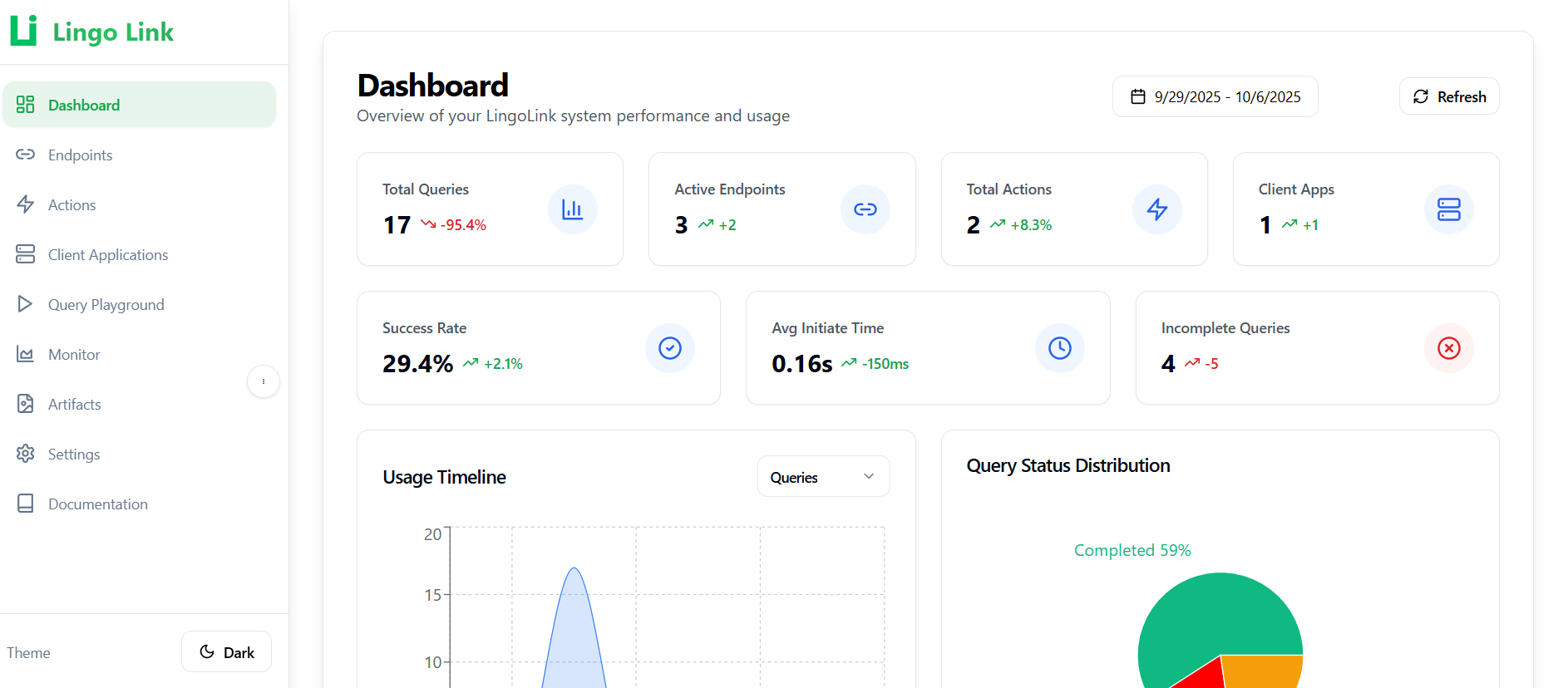
Lingo-Link: Transform Your API Integration with AI-Powered Orchestration
By Heurista Team • October 6, 2024
Lingo-Link: Transform Your API Integration with AI-Powered Orchestration
In today's interconnected digital landscape, applications rarely work in isolation. They need to communicate with multiple APIs, process data from various sources, and orchestrate complex workflows. Traditionally, this requires extensive coding, configuration management, and maintenance overhead. Enter Lingo-Link - our flagship AI-powered API orchestration platform that changes everything.
What is Lingo-Link?
Lingo-Link is an intelligent middleware that transforms natural language queries into structured API calls. Instead of writing complex integration code, you simply describe what you want in plain English, and our multi-agent AI system handles the rest.
Platform Architecture Overview
Understanding how Lingo-Link works requires looking at its core components and how they interact:
The Complete Ecosystem
YOUR APPLICATION
Your Backend
REST API
Client App
Webhook Endpoint
LINGO-LINK PLATFORM
Management Dashboard (Web UI)
Query API (REST)
/api/v1/general-query(Sync)/api/action-query(Async)/api/action-query/:id(Status)Agentic AI Processing Pipeline
1. API Endpoints Selection
2. Actions Selection
3. Execution Order Analysis
4. Endpoints Calling
5. Actions Calling
6. Response Validation
7. Visualizations Generation
8. Syntax Validation
Connected Endpoints
Key Components Explained
1. Management Dashboard (Web UI)
Your control center for configuring and monitoring Lingo-Link:
- Endpoint Management: Register and configure your API endpoints
- Client Apps: Set up applications that receive async callbacks
- Query History: View all past queries and their results
- Token Analytics: Monitor AI usage and costs
- Action Configuration: Define asynchronous actions
2. Query API (For Developers)
RESTful API that your applications use to interact with Lingo-Link:
- General Query: Synchronous, immediate responses
- Action Query: Asynchronous processing with webhooks
- Status Tracking: Real-time query progress monitoring
3. Multi-Agent Processing Pipeline
8 specialized AI agents that collaborate to process queries:
- Agents work in parallel when possible for optimal speed
- Each agent has specific responsibilities and expertise
- Intelligent coordination ensures accurate results
4. Client Applications
Your applications that:
- Send queries to Lingo-Link via API
- Receive async results via webhook callbacks
- Can be configured with custom callback URLs
5. Connected Endpoints
Your actual APIs and services that Lingo-Link orchestrates:
- Internal REST APIs
- Third-party services
- Database queries
- External action processors
How to Connect Your APIs to Lingo-Link
Connecting your APIs to Lingo-Link is straightforward. Here's a complete guide:
Step 1: Access the Management Dashboard
Log in to the Lingo-Link dashboard at your platform URL. This is your central hub for:
- Registering API endpoints
- Configuring client applications
- Monitoring query performance
- Tracking token usage and costs
Step 2: Register Your API Endpoints
In the dashboard, navigate to "Endpoints" and click "Add Endpoint". Define your API with:
// Example: Registering a user profile endpoint
{
  name: "Get User Profile",
  description: "Retrieves user profile information by ID",
  method: "GET",
  url: "https://api.yourservice.com/users/{userId}",
  parameters: [
    {
      name: "userId",
      type: "path",           // Can be: path, query, or body
      dataType: "string",     // Can be: string, integer, boolean, array, object
      required: true,
      description: "Unique user identifier"
    }
  ],
  headers: {
    "Authorization": "Bearer YOUR_API_KEY",
    "Content-Type": "application/json"
  }
}
You can register:
- REST APIs (GET, POST, PUT, DELETE, PATCH)
- GraphQL endpoints
- Database queries
- Third-party service integrations
- Custom internal APIs
Step 3: Create Client Applications (Optional)
If you need asynchronous processing with callbacks, create a client application in the dashboard:
// Client application configuration
{
  name: "My Application",
  description: "Backend app for processing async actions",
  callbackUrl: "https://your-app.com/webhooks/lingo-link",
  apiKey: "secure_webhook_authentication_key"
}
This allows Lingo-Link to send results back to your application via webhooks when long-running operations complete.
Step 4: Get Your API Key
From the dashboard, generate an API key for your application. This key will be used to authenticate all queries from your code.
Step 5: Start Querying
Now the magic happens - just ask in natural language:
// Simple synchronous query
const response = await fetch('https://lingo-link.api/v1/general-query', {
  method: 'POST',
  headers: {
    'X-API-Key': 'your_api_key',
    'Content-Type': 'application/json'
  },
  body: JSON.stringify({
    query: "Get me the profile information for user ID 12345"
  })
});

const result = await response.json();
console.log(result.response);
// "The user profile shows: John Doe, email: john@example.com, joined: 2024-01-15..."
Advanced Use Cases
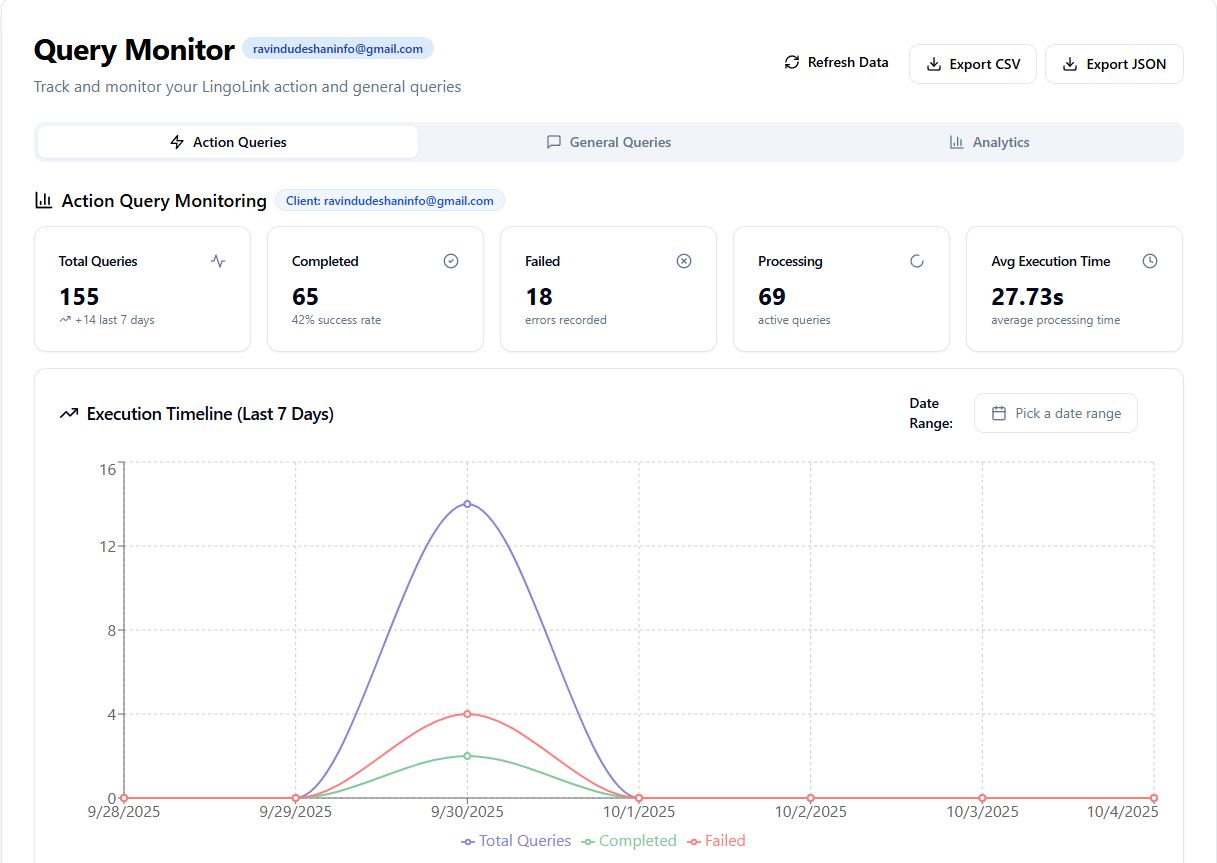
Real-time Monitoring & Analytics
One of Lingo-Link's most powerful features is comprehensive monitoring. Track every query with:
- Query Progress: See which agents are executing in real-time
- Token Usage Analytics: Monitor AI token consumption per agent
- Performance Metrics: Analyze response times and success rates
- Cost Tracking: Keep tabs on API usage and AI costs
Asynchronous Action Processing
For long-running operations, use action queries with callbacks:
// Initiate async action
const response = await fetch('https://lingo-link.api/action-query', {
  method: 'POST',
  headers: {
    'X-API-Key': 'your_api_key',
    'Content-Type': 'application/json'
  },
  body: JSON.stringify({
    query: "Process all pending orders and send confirmation emails",
    selectionMethod: "ACTIONSORAPI",
    clientApplicationId: "your_client_app_id"
  })
});

const { queryId } = await response.json();

// Your webhook receives the results when complete
app.post('/lingo-link/callback', (req, res) => {
  console.log('Query completed:', req.body);
  // Process the results in your application
  res.json({ success: true });
});
Transforming Your Applications
Before Lingo-Link
// Traditional approach - lots of boilerplate
const axios = require('axios');

async function getUserData(userId) {
  try {
    const userResponse = await axios.get(`https://api.service1.com/users/${userId}`, {
      headers: { 'Authorization': 'Bearer TOKEN1' }
    });

    const ordersResponse = await axios.get(`https://api.service2.com/orders`, {
      params: { userId: userId },
      headers: { 'X-API-Key': 'KEY2' }
    });

    const analyticsResponse = await axios.post('https://api.service3.com/analytics', {
      userId: userId,
      metrics: ['views', 'clicks']
    }, {
      headers: { 'Authorization': 'Token TOKEN3' }
    });

    // Manual data aggregation
    return {
      user: userResponse.data,
      orders: ordersResponse.data,
      analytics: analyticsResponse.data
    };
  } catch (error) {
    // Error handling for each API
    console.error('API call failed:', error);
    throw error;
  }
}
After Lingo-Link
// With Lingo-Link - clean and simple
const response = await fetch('https://lingo-link.api/v1/general-query', {
  method: 'POST',
  headers: { 'X-API-Key': 'your_api_key' },
  body: JSON.stringify({
    query: "Get user data, their orders, and analytics for user ID 12345"
  })
});

const result = await response.json();
// Done! Lingo-Link handles all the complexity
MCP Server Integration: The Ultimate Superpower
One of the most exciting capabilities of Lingo-Link is its integration with Model Context Protocol (MCP) servers. By connecting Lingo-Link as a tool in any MCP server, you unlock unprecedented analytical capabilities.
What This Means
When integrated with MCP servers like Claude Desktop, Cursor AI, or any MCP-compatible system, Lingo-Link becomes a powerful tool that can:
- Query Your APIs in Natural Language - Ask questions about your data conversationally
- Generate Insightful Predictions - Combine multiple data sources for AI-powered analysis
- Automate Complex Workflows - Chain multiple API calls intelligently
- Create Visual Reports - Automatically generate charts and visualizations from data
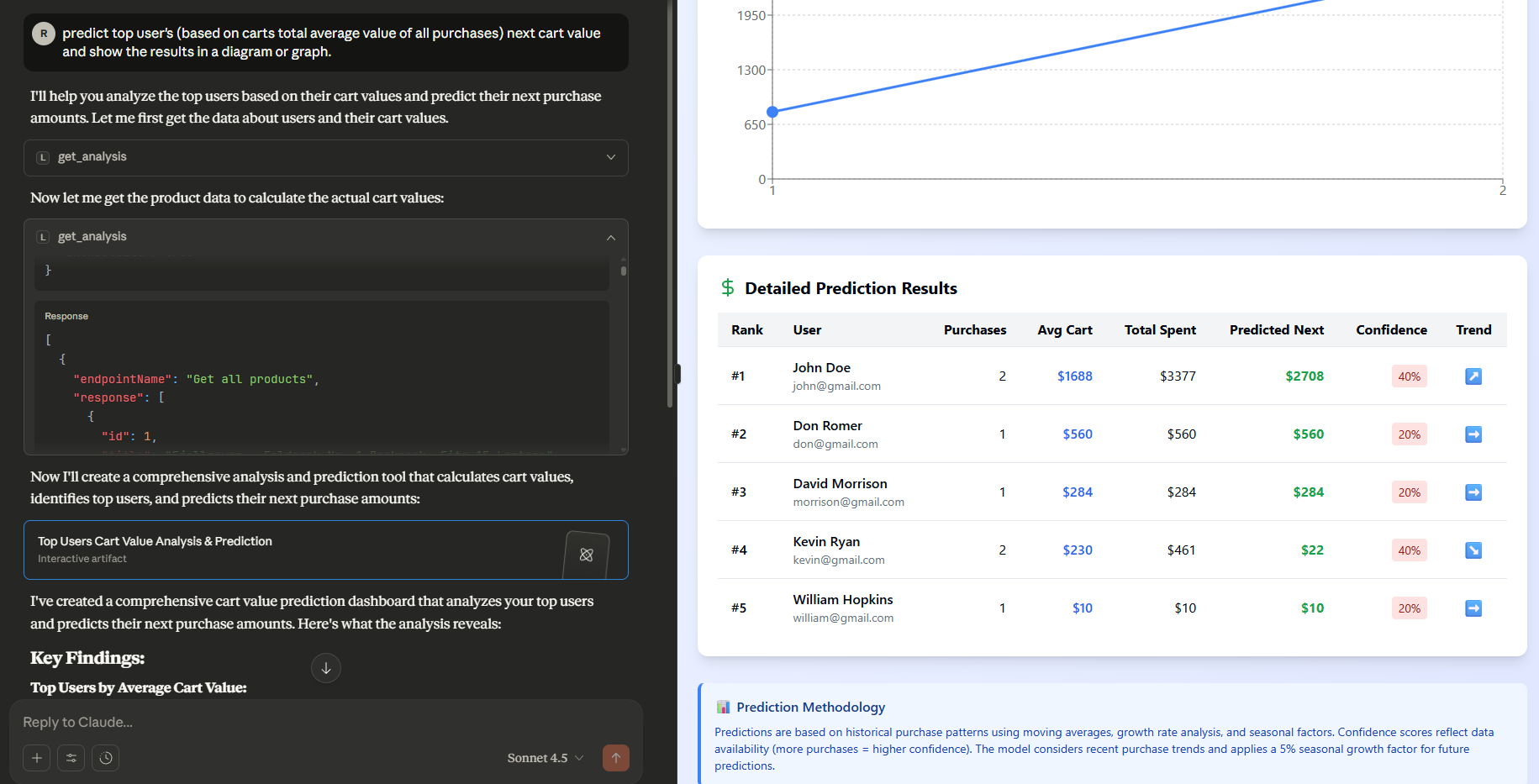
Real-World Example: Predictive Analytics
Imagine asking your AI assistant: "Analyze our sales trends for the last quarter and predict next month's revenue"
With Lingo-Link connected to your MCP server:
- The AI assistant uses Lingo-Link as a tool
- Lingo-Link queries your sales API, analytics API, and CRM
- Multiple agents process the data in parallel
- AI generates predictions based on the aggregated data
- Visualization agent creates interactive charts
- You receive a complete analysis with visual insights
Integration Example
// MCP Tool Configuration
{
  "mcpServers": {
    "lingo-link": {
      "command": "npx",
      "args": ["-y", "lingo-link-mcp-server"],
      "env": {
        "LINGO_LINK_API_KEY": "your_api_key",
        "LINGO_LINK_BASE_URL": "https://api.lingo-link.io"
      }
    }
  }
}
Now your MCP-enabled AI can use Lingo-Link to:
- Access all your connected APIs
- Generate real-time analytics
- Create predictive models
- Orchestrate complex data operations
Key Benefits
1. Eliminate Code Duplication
No more writing the same API client code over and over. Define endpoints once, use them everywhere through natural language.
2. Reduce Configuration Overhead
Stop maintaining separate configuration files for each service. Lingo-Link handles authentication, headers, and parameters automatically.
3. Accelerate Development
What used to take days of integration work now takes minutes. Focus on building features, not plumbing code.
4. Real-time Insights
Monitor query execution, track token usage, and optimize performance with built-in analytics dashboards.
5. Enterprise-Grade Reliability
Built-in retry logic, error handling, and comprehensive logging ensure production-ready reliability.
Use Cases
For ML Engineers
// Collect training data from multiple sources
const response = await lingoLink.query(
  "Fetch customer data from CRM, behavior data from analytics, and transaction history for the last 6 months"
);
For Data Scientists
// Generate automated reports
const report = await lingoLink.query(
  "Create a quarterly performance report with revenue trends, customer acquisition, and churn analysis"
);
// Returns data + auto-generated visualizations
For Product Teams
// Monitor product metrics
const metrics = await lingoLink.query(
  "Show me today's active users, feature adoption rates, and error frequencies"
);
Getting Started
Ready to transform your API integration workflow?
- Sign up for Lingo-Link at lingo-link.io
- Connect your APIs through the intuitive dashboard
- Start querying in natural language
- Monitor & optimize with real-time analytics
Try It Free
Experience the power of AI-driven API orchestration with our free tier. No credit card required.
Conclusion
Lingo-Link represents the future of API integration - where natural language meets intelligent automation. Whether you're building ML pipelines, creating data-driven applications, or managing complex microservices, Lingo-Link eliminates the complexity and lets you focus on what matters: building great products.
The integration with MCP servers takes this even further, enabling AI assistants to interact with your entire API ecosystem seamlessly. This creates a new paradigm where your AI can query, analyze, and act on your data with unprecedented ease.
Ready to experience the future? Start your Lingo-Link journey today.